Description: Link your Steam account to this server and sync your games.
Usage: /linksteam <Steam URL or VanityURL or SteamID64>
Example: /linksteam https://steamcommunity.com/profiles/76561198000000000
Permissions: Everyone
Extra Info
- Accepts:
- Full profile URL, for example
https://steamcommunity.com/profiles/7656... - Vanity or custom URL name, for example
/id/YourName - Raw SteamID64, 17 digits
- Full profile URL, for example
- If vanity fails to resolve, use the numeric SteamID64 or this guide: How to find your Steam vanity or SteamID.
- If your game details are private, the sync may import zero games. Temporarily set them to visible, sync once, then set back to private: Steam privacy settings.



Description: Unlink your Steam account and remove synced Steam games for this server.
Usage: /unlinksteam
Example: /unlinksteam
Permissions: Everyone
Extra Info
- Removes Steam-sourced games from this server only. Other servers are not affected.
- Manual entries that you added yourself are not removed by this command.
- You can re-link later and resync your library at any time.


Description: Force a Steam resync for your account in this server. Limit 2 per day.
Usage: /syncmysteam
Example: /syncmysteam
Permissions: Everyone
Extra Info
- Limit is 2 manual syncs per user per day.
- Updates only Steam-sourced entries. Manual entries are not affected.
- If your games are private, the sync may import zero games. See the privacy link below.



Description: Show your stored games for this server with paging.
Usage: /mygames [public:true|false]
Example: /mygames public:false
Permissions: Everyone
Extra Info
- The public parameter controls visibility:
public:trueposts a normal message that everyone in the channel can see.public:falseor omitting the parameter posts ephemerally so only you can see it.
- Hidden games appear after a gray Hidden Games divider page and are excluded from /findgamers.
- Playtime is shown in minutes when available.


Description: See your games and how many members here own them. Paginated.
Usage: /findgamers [public:true|false]
Example: /findgamers public:false
Permissions: Everyone
Extra Info
- Counts exclude you and only include visible entries in this server.
- Use the View Game Owners button to open a private owners list with paging.
- Owners lists only include current server members.


Description: Report a Steam link that appears to be linked to the wrong Discord account.
Usage: /report
Example: /report
Permissions: Everyone
Extra Info
Use this command if you think an account has been incorrectly linked to an account, or if someone is maliciously linking false accounts to their Discord account. All reports are manually reviewed, so please provide as much information as possible.

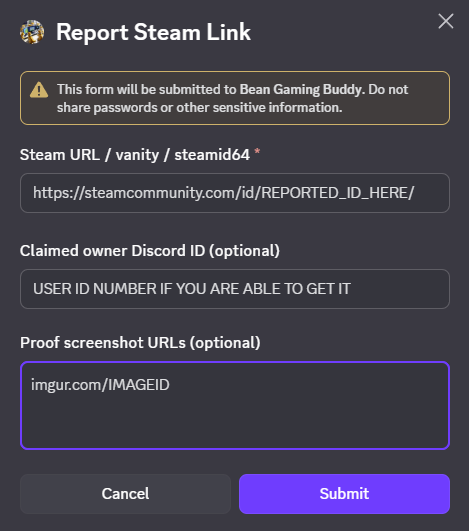
Steam URL / vanity / steamid64: Paste the Steam profile for the account you believe is linked incorrectly. You can use a full profile link, a custom /id/ link, or the 17-digit SteamID.
Claimed owner Discord ID (optional): If you know the correct account owner, paste their Discord ID (numbers only). If you do not know it, leave this blank and submit the report anyway.
Proof screenshot URLs (optional): Add up to 3 links, one per line. A screenshot of the Steam profile while signed in is usually enough. Right now, Imgur links are supported.
Extra comments: Add any extra comments or information that may be helpful in resolving the report.
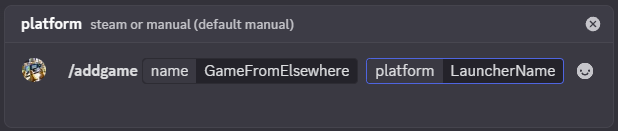
Description: Add a game that already exists in the database to your profile here.
Usage: /addgame name:<Exact Name> [platform:manual|steam]
Example: /addgame name:Elden Ring platform:manual
Permissions: Everyone
Extra Info
- The name must match an existing game in the DB. If missing, contact the bot operator to add it.
- Platform parameter:
- manual (default). Best for non-Steam or when Steam sync failed.
- steam only when it is a real Steam game that failed to attach automatically.

Description: Remove a game from your profile. Steam entries are hidden.
Usage: /removegame game:<ID or Name> [platform:auto|manual|steam]
Example: /removegame game:570 platform:steam
Permissions: Everyone
Extra Info
platform:auto(default) inspects the stored entry to decide whether to delete manual or hide steam.- Manual entries are deleted. Steam entries are hidden and remain hidden on future syncs until unhidden.
- You can target by numeric ID or the exact stored name. Fuzzy name matching tries to help when needed.



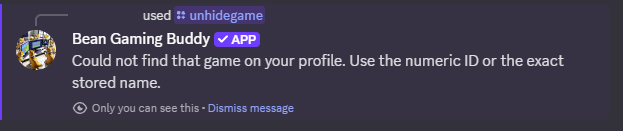
Description: Unhide a Steam game that was previously hidden.
Usage: /unhidegame game:<ID or Name>
Example: /unhidegame game:Elden Ring
Permissions: Everyone
Extra Info
- Only works for entries that came from Steam and were hidden.
- Manual entries are never hidden. They are added or removed directly.
- Once unhidden, the game can appear in /findgamers again.


Description: Force resync of all linked Steam accounts in this server.
Usage: /syncnow
Permissions: Bot Owner
Extra Info
- Runs against all members in this server with a linked SteamID64.
- Use sparingly to avoid rate limits and reduce load.
- Posts a summary with users processed and total games updated.


Description: Allow or block multiple Discord accounts linking the same SteamID in this server.
Usage: /allowmultiples allow:<true|false>
Example: /allowmultiples allow:true
Permissions: Server Admin (Manage Guild) or Bot Owner
Extra Info
- Default is
false(blocked). New links are rejected if the SteamID64 is already linked to a different member. - When set to
true, alt accounts can link the same SteamID64. Data remains scoped per user and per guild. - No cross-guild effects. Other servers are not impacted.
- Changing this setting does not delete existing links. It only controls future link attempts.

To allow the bot to see your library, set your Steam privacy so that Game details are visible. Follow this quick video and then run /syncmysteam:
- Open Steam Profile settings.
- Go to Privacy settings.
- Set Game details to Public or Friends.
- Save, then run
/syncmysteam.
This is almost always a privacy setting. Follow the same privacy video and make sure the Game details field is set to Public. Playtime is part of Game details. After adjusting, run /syncmysteam again.
The public parameter controls how the bot posts the result panel:
public:trueposts a normal message that everyone can see in the channel.public:falseor if you omit the parameter, the bot replies ephemerally so only you can see it.
This is to protect the Steam API key quota. If your server needs higher limits, contact the bot operator.
- Manual Entry (default). Not controlled by Steam sync and can be fully deleted.
- Steam Entry. Rare case to fix a Steam game that failed to attach. These are hidden, not deleted.
Use this short video to locate your vanity or the numeric SteamID64:
Find your Steam vanity or SteamID